
Shoppers arrive at checkout with their own habits. Some type in the card number they know by heart, while others expect to tap Apple Pay, Google Pay or PayPal and be finished in seconds. Supporting both can lift your conversion rate, provided the payment page stays tidy and the setup behind it stays manageable. Get either of those wrong and the extra choice ends up slowing people down. The good news is that one simple, secure checkout can handle both.
Cards still carry a lot of weight online. People know how they work, they're accepted almost everywhere, and they remain the usual choice for bigger purchases and subscriptions.
Wallets have caught up quickly, though. They now handle close to a third of point of sale spending worldwide, according to McKinsey figures shared by Stripe, and around six in ten shoppers say they're happy to use one. Their appeal comes down to speed, especially on a phone, where typing out sixteen digits is nobody's idea of fun.
Which wallet people reach for depends a lot on where they live. A favourite in one country can be almost unknown in the next, so the sensible move is to offer what your own customers already use.
Both options lead to the same result, yet the experience feels quite different for the customer.
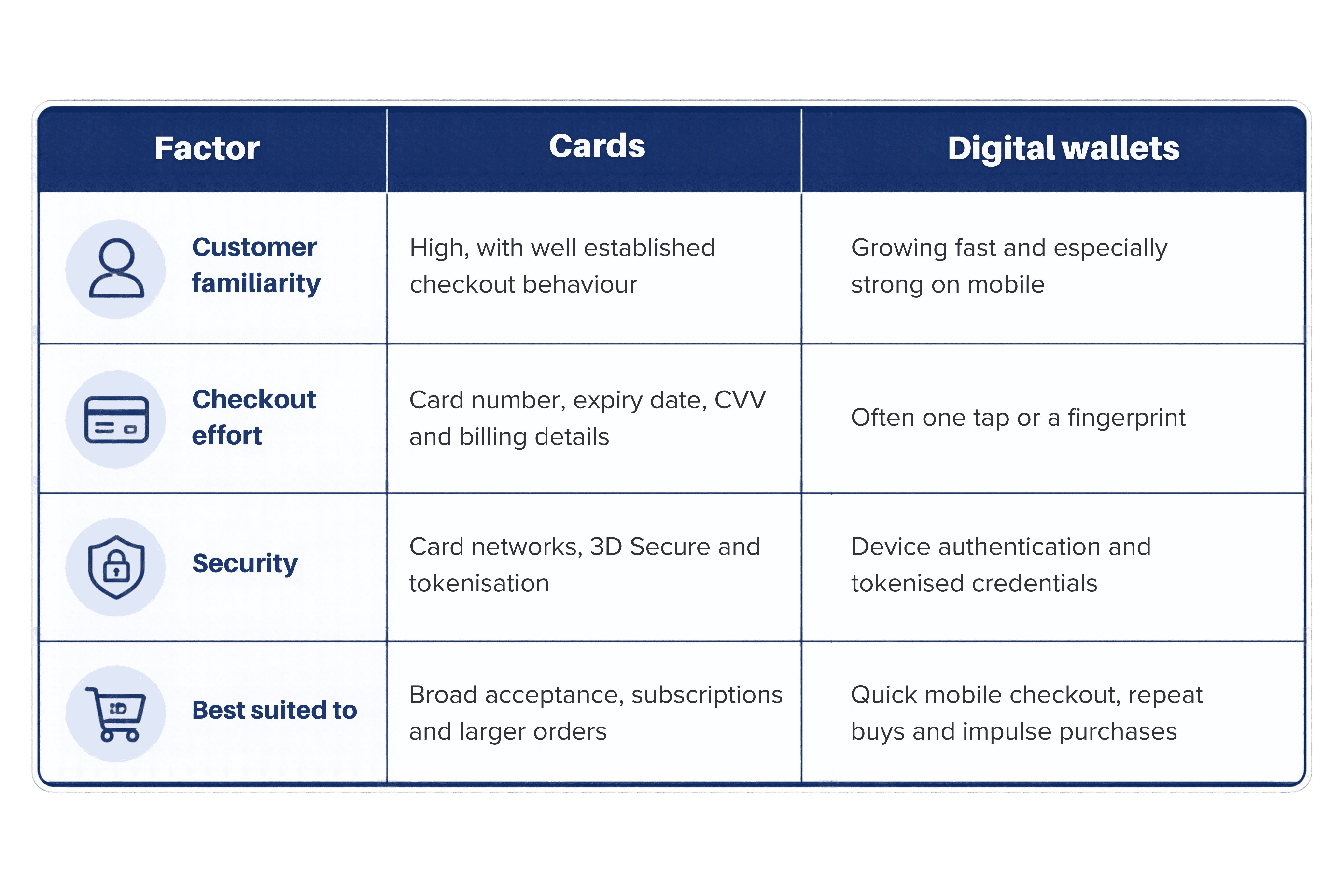
The biggest gap is effort. A card asks the shopper to find and enter several details, whereas a wallet usually needs a fingerprint, a face scan or a single tap. Security holds up well on both sides, with each one protecting the customer in its own way.
Speed counts for a lot at checkout. Once the process stretches beyond a minute and a half, conversion can drop by nearly half, according to a Digital Commerce 360 study cited by U.S. Bank. Merchants in the same study pointed to two big reasons for abandoned carts. Three in four blamed manual card entry, and over half blamed a missing payment option.
Wallets solve the typing problem, cutting average mobile checkout time in half based on Stripe's data. Cards cover shoppers who don't use a wallet or whose device doesn't support one, so between them you reach a far wider audience.
Piling on every payment method you can find tends to backfire, though. Stripe's tests showed that a single option irrelevant to the shopper's country can knock conversion down by as much as 15%. Getting the local favourite right works the other way, with BLIK in Poland and Pix in Brazil both giving conversion a healthy lift. The goal is a well chosen mix for your audience.
Once you know which methods to offer, the next job is presenting them well. Show the most relevant options first based on the shopper's device, location and past purchases, so an iPhone user sees Apple Pay up top while an Android user sees Google Pay.
Give the main payment button clear priority too. When every option looks equally important, shoppers pause to compare, and that hesitation costs sales. Keep cards and wallets on one payment page so the journey feels the same whichever option someone picks. For returning customers, remember their preferred method and make it easy to switch.
The same thinking applies behind the scenes. A single payment gateway that handles cards and wallets through one API and one dashboard saves your developers and finance team a great deal of effort. Prebuilt plugins or SDKs for your ecommerce platform cut build time even further.
Check that your provider handles tokenisation, 3D Secure, fraud screening and payment status updates in the same way for every method. With everything in one place, there's less code to maintain and reconciliation gets easier. Your customers also get a consistent experience whichever way they pay.
A unified setup makes it easier to apply the same security rules everywhere. Every method should get PCI compliant data handling, tokenisation, fraud monitoring and strong customer authentication where regulations call for it.
Wallets deserve the same scrutiny as cards, so keep an eye on refunds, chargebacks and unusual transaction patterns across the board. Done well, security stays out of the way for genuine customers while working hard in the background.
When you're ready to launch, work through these steps.

